

How to install Smart LED bulbs?
Affiliate links — we may earn a commission
Installing Smart LED bulbs is an easy process that can be done by anyone, regardless of their experience with smart home technology. Simply follow the step-by-step instructions in this guide to upgrade your lighting system and enjoy the benefits of energy efficiency and smart control.
Top Choices for Smart Lighting Solutions


Gather the necessary equipment
Before starting the installation process, it is essential to gather all the necessary equipment. Here’s a simple checklist to ensure you’re well-prepared:
- Smart LED bulbs: These are the heart of your smart lighting setup. Make sure you have the desired number of bulbs based on your lighting needs and preferences.
- Compatible smart home hub or device: Depending on the brand or type of smart LED bulbs you choose, you may need a smart home hub or device to connect and control them. Check the manufacturer’s instructions to confirm compatibility.
- Smartphone or tablet with the corresponding app: Most smart LED bulb systems require a smartphone or tablet to set up and control the lighting. Download the corresponding app from the app store that is supported by your smart LED bulb system.
- Stable Wi-Fi connection: Smart LED bulbs communicate with the app and other devices through your home’s Wi-Fi network. To ensure a seamless experience, make sure your Wi-Fi connection is stable and provides good coverage throughout the area where you plan to install the bulbs.
By having all these items ready, you can proceed with the installation process smoothly. Remember, having the right equipment is crucial to ensure a successful and enjoyable smart lighting experience.


Turn off the power
To ensure your safety when working with electrical installations, it is essential to turn off the power before replacing a light fixture with a Smart LED bulb. Start by locating the switch or circuit breaker that controls the power supply to the fixture. This switch or breaker is typically found in the electrical panel of your home. Once you have located it, turn the switch off or flip the breaker to the “off” position. By doing so, you are effectively cutting off the electricity flow to the light fixture, minimizing any potential hazards. Always prioritize safety and double-check that the power is indeed turned off before beginning any work.
Remove the existing bulb
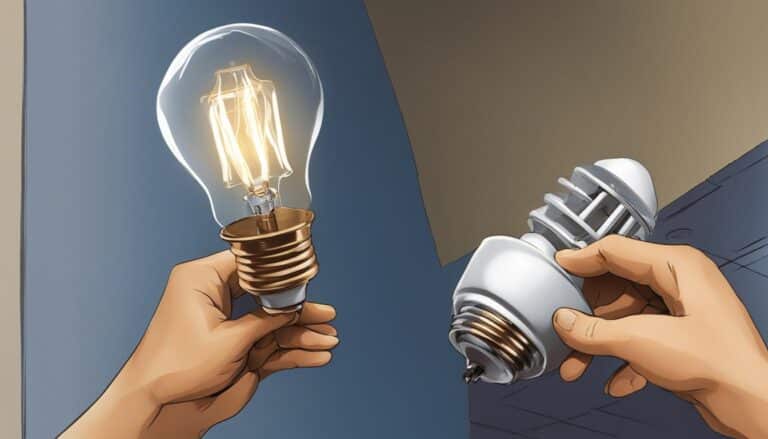
To remove the existing bulb, first, ensure that the power to the socket is switched off. Safety comes first! Next, cautiously unscrew the bulb from the socket. It’s important to remember that certain types of bulbs may still be hot, so it’s best to allow them to cool down before attempting to remove them. This will prevent any accidental burns or injuries. Once the bulb has cooled, use a gentle yet firm grip to unscrew it counterclockwise from the socket. Be sure not to apply excessive force, as this could cause the bulb to break. Now you’re ready to continue with the next steps in replacing the bulb.


Install the Smart LED bulb
To install the Smart LED bulb, begin by taking the bulb and screw it into the empty socket. Make sure to insert it straight into the socket. Gently turn the bulb clockwise until you feel it start to catch. Ensure that it is securely in place, but be careful not to over-tighten it as this could cause damage to the bulb or the socket.
Before proceeding, double-check that the bulb is compatible with the socket and fits properly. Different sockets may have different sizes or shapes, so it’s essential to ensure a proper fit. If unsure, refer to the user manual or consult with the manufacturer to ensure compatibility.
By following these simple instructions, you will have your Smart LED bulb installed in no time, enabling you to enjoy its various features and benefits.
Connect the bulb to the app
To connect the Smart LED bulb to your smart home hub or device, simply open the corresponding app on your smartphone or tablet. Once the app is open, follow the instructions provided to establish a connection. This typically involves scanning a QR code or entering a unique code that comes with the bulb. Make sure to position your device’s camera correctly to scan the QR code if applicable. The app will guide you through the necessary steps to successfully connect the bulb to your smart home system.
Test and customize
- Establish the connection between the Smart LED bulb and your device.
- Turn on the power to the light fixture.
- Ensure that the Smart LED bulb is functioning correctly.
- Open the app on your device and navigate to the bulb settings.
- Customize the brightness of the bulb according to your preference by adjusting the slider.
- Personalize the color of the bulb by selecting from the available color options in the app.
- Set up a schedule for the bulb to automatically turn on or off at specific times using the scheduling feature in the app.
- Explore other customization options available in the app, such as dimming, color temperature, and effects.
- Don’t forget to save your settings to apply them to the Smart LED bulb.
- Enjoy your fully customized lighting experience!
Remember, if you encounter any difficulties during the process or have further questions, consult the user manual or contact customer support for assistance.
Final Steps for Success
In conclusion, installing Smart LED bulbs is a straightforward process that anyone can do. Just follow the steps provided in this blog post, refer to the manufacturer’s instructions, and you’ll be able to enjoy the convenience and energy efficiency of these bulbs in no time. Don’t hesitate to reach out if you have any questions or need further assistance. Happy installing!
Essential Tools and Materials


Getting Started with Smart LED Installation
Getting started with your Smart LED bulbs
- First, make sure you have a compatible smart home hub or smart device, such as a smart assistant (like Amazon Alexa or Google Assistant), or a dedicated hub (like Philips Hue or LIFX). This will allow you to control the smart LED bulbs using your voice or smartphone
- Install the smart LED bulbs into the desired sockets or fixtures just like you would with traditional bulbs. They usually come with standard bases, so you can easily replace your existing bulbs
- Connect the smart LED bulbs to your home network by following the manufacturer’s instructions. This typically involves using an app on your smartphone to connect to the bulbs using Wi-Fi or Bluetooth. Some bulbs may require a hub to be connected first for proper integration
- Once the smart LED bulbs are connected, use the app or voice commands to control them. These bulbs often offer features such as dimming, changing colors, scheduling, and even syncing with music or movies. The app will provide you with a range of options to customize your lighting experience
- Finally, don’t forget to familiarize yourself with the additional features of your smart LED bulbs. Some bulbs can be controlled remotely when you’re away from home, and others can be integrated with other smart devices or services, allowing you to create advanced automation scenarios
- Remember, everyone’s setup can vary slightly depending on the brand and model of the smart LED bulbs you choose. So, be sure to read the manufacturer’s instructions to fully understand their specific functionalities and capabilities. Enjoy exploring the world of smart lighting!
Smart LED bulbs: Frequently Asked Questions
Can Smart LED bulbs be integrated with voice assistants like Alexa or Google Assistant?
Absolutely! Smart LED bulbs can indeed be integrated with voice assistants like Alexa or Google Assistant. These voice assistants typically have compatibility with various smart home systems, and connecting your Smart LED bulbs is a quick and straightforward process. Once connected, you can control your Smart LED bulbs with simple voice commands, such as turning them on or off, adjusting brightness, or even changing colors if your bulbs support it. It’s fantastic to have the convenience of hands-free control over your lighting!
Are Smart LED bulbs energy-efficient?
Yes, Smart LED bulbs are indeed energy-efficient. LED stands for Light Emitting Diode, and these bulbs consume less energy compared to traditional incandescent or even fluorescent bulbs. Smart LED bulbs take energy-efficiency a step further by allowing you to control and customize the brightness and color temperature, helping you save even more energy. Additionally, most Smart LED bulbs are designed to last longer, which further contributes to their energy-efficiency. So, if you’re looking for an energy-efficient lighting option, Smart LED bulbs are a great choice!
What are Smart LED bulbs?
Smart LED bulbs are innovative lighting devices that combine the benefits of LED technology with the convenience of smart home technology. These bulbs are designed to be controlled remotely through a smartphone or a voice assistant, such as Amazon Alexa or Google Assistant.
A smart LED bulb can be connected to your home’s Wi-Fi network, allowing you to control it from anywhere using a dedicated app on your smartphone. With the app, you can turn the bulb on or off, adjust the brightness levels, and even change the color of the light emitted by the bulb.
One of the main advantages of smart LED bulbs is their energy efficiency. LED technology is known for its low power consumption, making these bulbs more eco-friendly and cost-effective compared to traditional incandescent bulbs or even standard LED bulbs.
Moreover, smart LED bulbs often come with additional features, such as scheduling capabilities, which allow you to set specific times for the bulb to turn on or off automatically. Some bulbs also have built-in motion sensors that can detect movement and turn the light on or off accordingly.
In summary, smart LED bulbs offer a convenient and efficient way to control your lighting at home. With their ability to be controlled remotely and their energy-saving benefits, they are becoming an increasingly popular choice for homeowners looking to upgrade their lighting setup.

I followed the guide, but I’m having trouble connecting the Smart LED bulb to the app. I’ve double-checked my Wi-Fi connection and followed all the steps, but the app doesn’t recognize the bulb. Any troubleshooting tips would be appreciated!
I’m sorry to hear that you’re experiencing difficulties with the app. One possible solution is to reset the Smart LED bulb and try the connection process again. To reset the bulb, turn it on and off three times in quick succession. If that doesn’t work, it could be an issue with the app itself. Try uninstalling and reinstalling the app, and make sure you have the latest version. If the problem persists, you may want to reach out to the manufacturer’s customer support for further assistance.
Great guide! I recently installed Smart LED bulbs in my home and it has made a huge difference. One tip I would add is to make sure you have a stable Wi-Fi connection before connecting the bulb to the app. I had some trouble initially because my Wi-Fi signal was weak in that room. Overall, the installation process was straightforward and the bulbs are working perfectly.
This guide was helpful, but do you have any advanced tips for installing Smart LED bulbs? I’m looking to maximize the functionality and features of the bulbs and would love some expert advice.
Thank you for your comment! I’m glad you found the guide helpful. In terms of advanced tips, one thing you can try is setting up schedules or routines for your Smart LED bulbs. This way, you can automate when the bulbs turn on and off, adjust brightness levels throughout the day, or even sync them with other smart devices in your home. It adds a whole new level of convenience and customization.
Who needs smart bulbs when candles are more romantic and eco-friendly? 🕯️
Why bother with Smart LED bulbs when candles provide a cozy atmosphere?
Who needs smart bulbs? Just stick with regular ones for simplicity!
This guide was helpful, but I would love to see more articles on home automation. It’s such an interesting and rapidly advancing field, and I’m sure there are many other topics and products worth exploring. Keep up the great work!
Thank you for your feedback! I’m glad you found the guide helpful. I completely agree that home automation is an exciting field, and there are indeed many other topics and products to explore. I’ll definitely keep that in mind for future articles. If you have any specific suggestions or areas of interest within home automation, feel free to let me know and I’ll be happy to consider them. Thank you for reading!
Who needs smart bulbs when candles are more romantic and eco-friendly? 🕯️
Why bother with Smart LED bulbs when candles create a cozy vibe?
Is it really necessary to turn off the power before installing a Smart LED bulb?
Do we really need to turn off the power to install a lightbulb? Seems excessive.
Yes, it may seem excessive to some, but safety should always come first. Turning off the power before installing a light bulb is a simple precaution that can prevent accidents and ensure a smooth installation process. Better safe than sorry!
Why bother with Smart LED bulbs when candles are eco-friendly and romantic?
Why bother with smart bulbs when candles create a cozy atmosphere?
Smart bulbs are a waste of money! Stick to traditional ones for simplicity.
I think Smart LED bulbs are overrated. Stick to regular ones!
Why bother with Smart LED bulbs when candles are more romantic? 🕯️
Candles may be romantic, but Smart LED bulbs are practical. They offer convenience, energy efficiency, and customizable lighting options. Plus, you dont have to worry about fire hazards or wax spills. Embrace the future and enjoy the best of both worlds with technology and romance.
I dont see the point in turning off the power. Its overkill. 🤷♀️
Turning off the power is a necessary safety measure to prevent accidents and damage during emergencies. Its not overkill; its responsible. Better safe than sorry! 🤷♀️ Always prioritize safety over convenience.
Interesting read, but Ive got to ask – why the emphasis on turning off the power? Ive swapped out plenty of bulbs without doing so and never had an issue. Is there a specific reason relating to smart bulbs? Also, would be cool to see a comparison of energy consumption between traditional and smart bulbs.
Just wondering, wouldnt it be more efficient to discuss possible challenges and solutions while installing Smart LED bulbs? Ive personally faced issues with the fitting not matching the bulb or the smart home system not being compatible. Think it would be great to see a section dedicated to troubleshooting these common problems.
Interesting read! However, isnt it essential to consider the compatibility of smart LED bulbs with existing fixtures and switches too? Also, wouldnt the power consumption vary based on the brand and type of smart bulb? Curious to know your thoughts.
Is it just me or does anyone else find it oddly satisfying to turn off the power before installing a Smart LED bulb? Its like a mini power trip in the name of home improvement! #DIYJoy
Wait, but what about compatibility issues with different smart bulbs? Ive heard horror stories of people buying the wrong ones. Anyone else faced this problem before? Tips welcome!
Why do we always have to turn off the power before installing smart bulbs? Is it really necessary or just a precaution? Ive never done it and everything works fine. Just saying!
I disagree with the articles suggestion to turn off the power before installing smart LED bulbs. Its safer to work with the power on to avoid any connection issues later on. What do you think?
Anyone else think installing Smart LED bulbs is overrated? Why not just stick to the good ol fashioned incandescents, eh?
Interesting article, but arent smart bulbs just a lazy excuse to avoid standing up to flip a switch? Thoughts anyone?
Guys, isnt it funny how we need a guide to install smart bulbs? Back in my day, screwing in a bulb was no rocket science.
While I appreciate the detailed steps, I cant help but wonder why were not discussing the environmental impact of these smart LED bulbs? Are we trading convenience for sustainability?
I dont get it. Why bother with these smart bulbs? Good ol regular bulbs work just fine for me. Plus, I bet the smart ones are spying on us. Anyone else feel the same?
Interesting read! But, wouldnt it be safer to hire a professional instead of potentially electrocuting ourselves during installation?
Interesting read, but shouldnt we be considering the energy consumption of these smart bulbs vs traditional lighting?